
Custom Forms & Data Collection for TruDriveSync
Build powerful, conditional forms that capture clean, structured data - and sync it straight into TruDriveSync. No more duct-taped form tools, spreadsheets, or manual re-entry.
Drag-and-drop builder • Conditional logic • CRM-ready data mapping
Adaptive forms that guide users
Use intelligent conditional logic to show only relevant questions and streamline completion.
Capture every submission (even partials)
Auto-save progress and collect partial data, so you never lose insights from abandoned forms.
All the input types you need
From text to signatures, uploads, star ratings, dates, colors, and more - all in one form.
Instant CRM synchronization
Map fields to Leads, Customers, Tickets, Tasks, and more in TruDriveSync - without manual data entry.
TRY OUR PLATFORM
What This Module Does
TruDriveSync’s Custom Forms & Data Collection module turns messy intake into structured, actionable records. Build branded, mobile-ready forms in minutes; apply branching logic; capture files and signatures; then route submissions to the right place - Leads, Customers, Projects, Tickets, Appointments, or custom objects - with automatic field mapping and follow-up workflows.
Key Capabilities

Form Builder
-
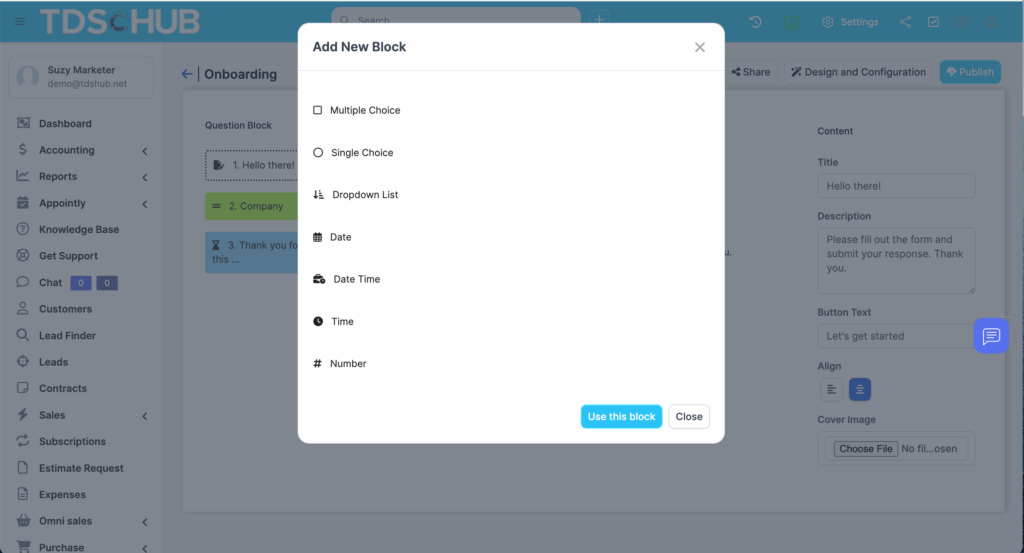
Drag-and-drop editor: Build forms fast without code.
-
Reusable templates: Kickstart with proven templates for lead capture, onboarding, support intake, job applications, and project briefs.
-
Brand controls: Logo, colors, typography, and custom thank-you pages.

Smart Logic & Guidance
-
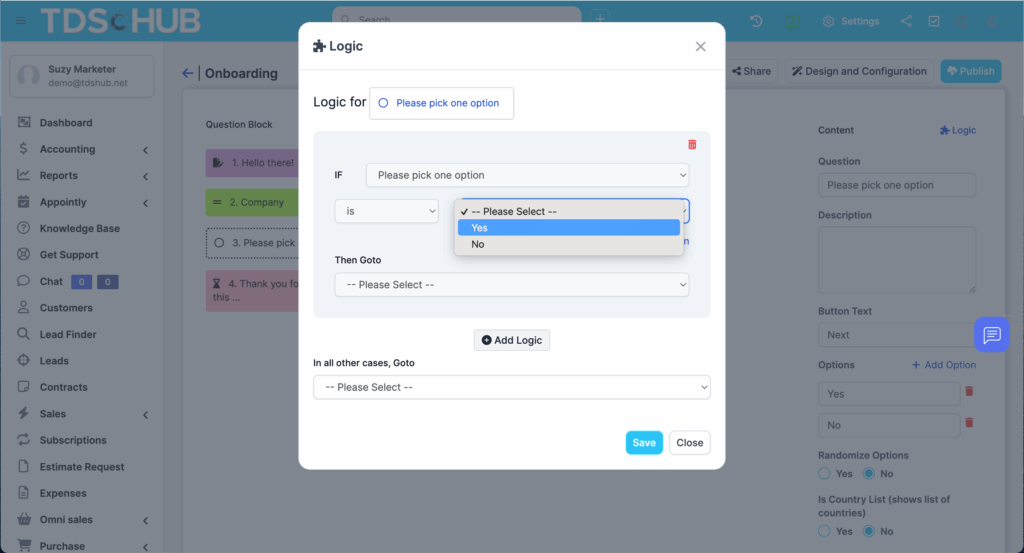
Conditional logic: Show, hide, skip, or branch questions based on prior answers.
-
Multi-step flows: Break long forms into steps with progress indicators.
-
Prefill & piping: Prefill known values and pipe answers into later questions for clarity.
Inputs & Data Types
-
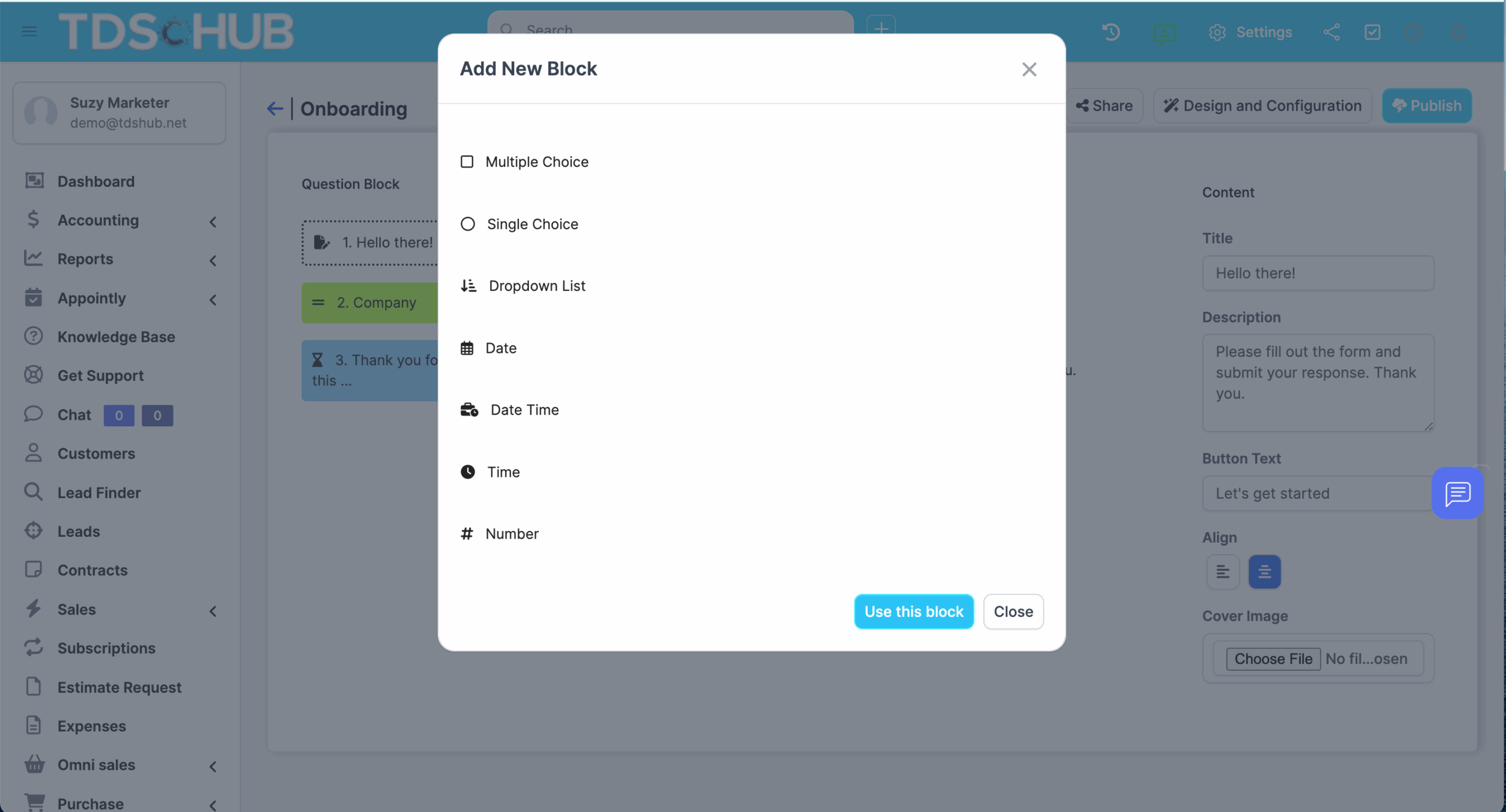
Everything you expect: Text, email, phone, dropdowns, checkboxes, radios, text areas, numbers.
-
Everything you want: File uploads, e-signature, star ratings, date/time, color picker, sliders, matrix scales, consent toggles, and more.
Data Mapping & Automations
-
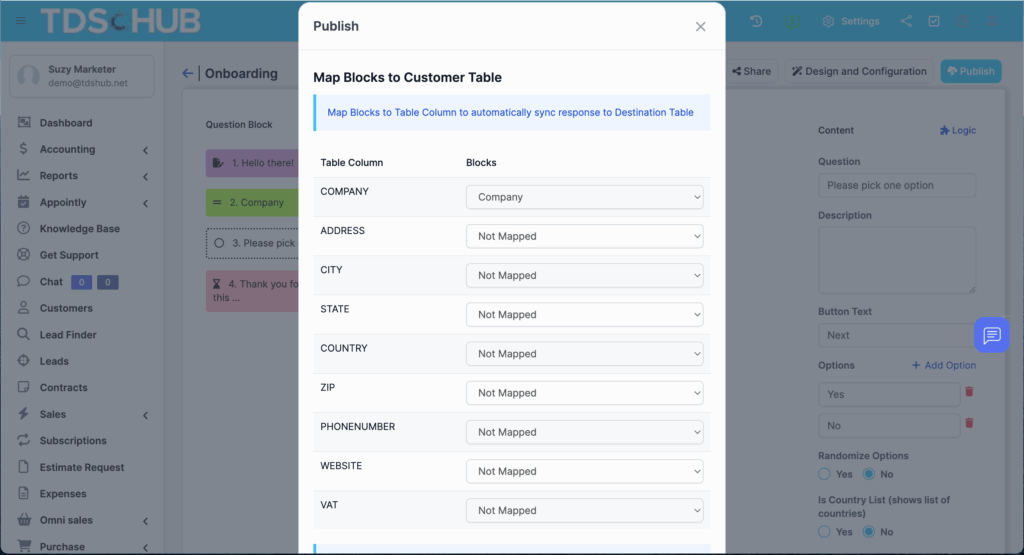
One-click mapping: Map any field to TruDriveSync entities and custom fields.
-
Create & update records: Turn a submission into a Lead, Customer, Ticket, Task, or Appointment — or update existing records by matching on email/ID.
-
Trigger workflows: Notify teams, assign tasks, start pipelines, or send email/SMS via your existing automations.
Distribution & Capture
-
Public links & QR codes: Share anywhere; great for kiosks, events, and job fairs.
-
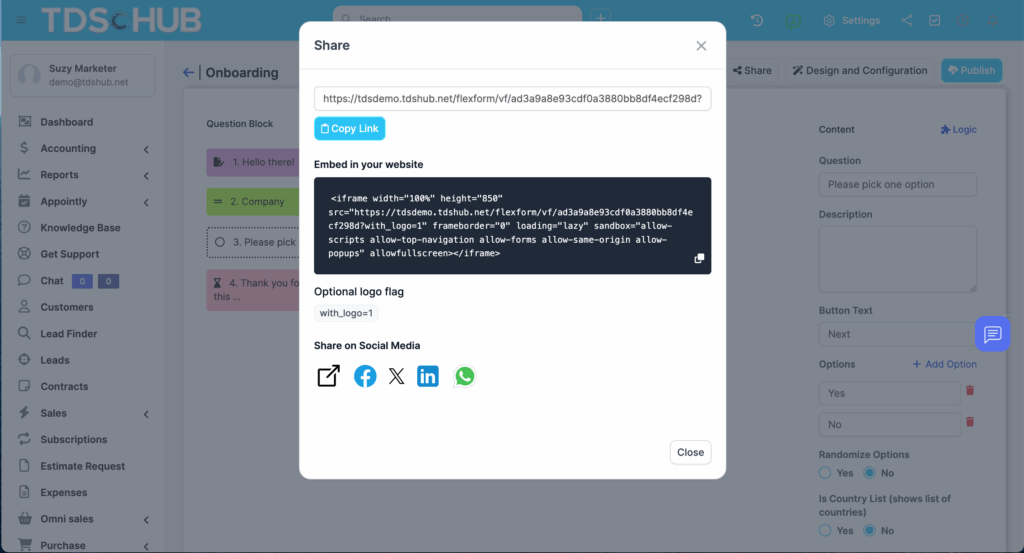
Embed on your site: Drop forms into landing pages, blogs, and portals.
-
Partial capture: Auto-save responses as people type, so sales and support can follow up even if they don’t hit “Submit.”
5 STEPS TO SUCCESS
How It Works
Choose a template (or start blank)
Pick a lead gen, onboarding, support, HR, or custom template - or build from scratch.
Drag in fields & set logic
Add inputs, group screens, and define show/hide branches, skips, and jump-to rules.
Map fields to TruDriveSync
Point each form field to the correct Lead/Customer/Project/Ticket/Task field or custom property.
Publish & share
Embed on your site, generate a public link/QR, or launch kiosk mode for in-person capture.
Automate follow-up
On submit (or partial), create/update records, notify the right team, and kick off workflows.
FREE 14-DAY TRIAL
Streamline Your Client Acquisition & Onboarding Today
Increase productivity and reduce manual tasks with TruDriveSync.
WHO WE HAD IN MIND
Designed For:
Sales & Marketing: High-quality lead capture with instant routing and follow-up.
Operations & Projects: Requirements, briefs, and change requests that land where work happens.
Support & Success: Intake forms that reduce back-and-forth by collecting the right context upfront.
HR & Recruiting: Applications with branching logic, file uploads, and structured scoring.
CONNECTED TOOLS
Why Teams Switch from Standalone Tools
One platform, one dataset: Submissions become real records — no copy-paste.
Context on tap: Drill from a submission into the linked Lead, Customer, Project, or Ticket.
Automation-ready: Every field can trigger actions, assignments, and pipelines in TruDriveSync.
No more lost leads: Partial capture + alerts keep hot prospects from slipping away.
Security & Controls
Permission controls: Make forms public, internal-only, or authenticated with role-based access.
Spam & abuse protection: reCAPTCHA/honeypot options, file type/size limits, rate limiting.
Data governance: Field-level validation, PII minimization guidance, and export on request.
Auditability: Time-stamped submission history and change logs.
What You Can Replace
Generic web form plugins that don’t sync to your CRM
Ad-hoc Google Forms/Typeform/Sheets handoffs
Manual email intake and unstructured PDFs

FAQs
Yes. Use field matching (e.g., email or customer ID) to update existing Leads/Customers.
Absolutely — include signature pads and upload fields with size/type restrictions.
Yes. Responses can be auto-saved and visible to your team for proactive follow-up.
You can show/hide fields, jump to sections, or branch steps based on any previous answer.
Yes. Create/update records, assign tasks, notify teams, and start pipelines automatically.
Yes - copy the embed code to place forms on landing pages, portals, or blogs.